
Google said on Wednesday that Chrome will gain an advanced autofill that pulls suggestions from Gmail when users complete online forms. The browser will be able to surface a flight confirmation number, membership ID, tracking information, order number, address, phone number, or credit card number found in email. The change matters because form filling moves from stored browser records to live retrieval from a mailbox.
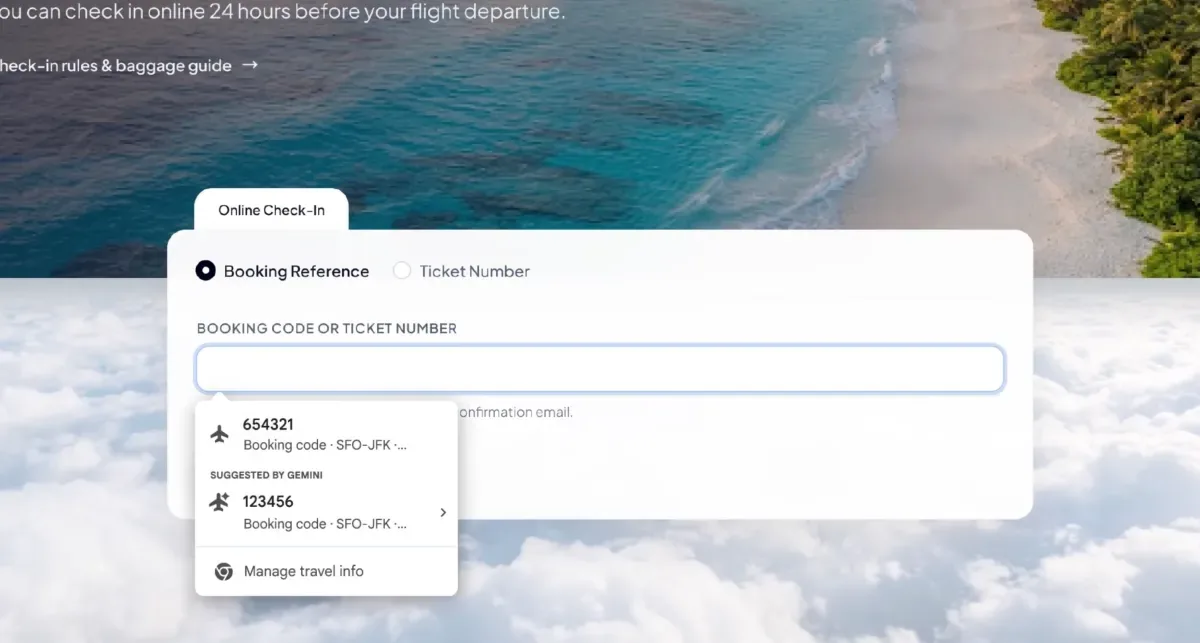
How Gmail-based autofill will work
The feature is described as an expansion of Personal Intelligence, the system that already connects Google Apps to the Gemini assistant. That connection lets Gemini retrieve selected details and use them to answer more complex questions. Chrome now applies the same access pattern to the practical task of completing web forms with data that users may not remember. The examples focus on transactional identifiers rather than general browsing history.
The mechanism centers on suggestions drawn from Gmail at the moment of filling a form. Instead of relying only on previously saved addresses or payment records, Chrome can reference email content for the missing field. Google presents this as help with information users might need to know but would otherwise search for manually. The company has not disclosed matching rules, ranking of candidates, or how it handles multiple similar messages. Sensitive data used in the process is encrypted.
The context is competition around ease of use and retention inside an AI ecosystem. TechCrunch compares the move to Apple automatic detection of verification codes sent by text, shown above the keyboard for entry with a single tap. Small reductions in friction have proved effective at keeping users with a default browser or platform. Google already links Gemini, Search, and its applications, so autofill becomes another point where assistance appears during routine work. Availability also signals where such integration arrives first.
What this means for companies using AI
For businesses, the practical effect is faster completion of routine web operations that depend on emailed identifiers. Support staff, procurement employees, logistics coordinators, and travelers often copy confirmation codes, tracking numbers, and order references from mail into portals. If suggestions appear directly in the form, handling time per request falls and transcription errors decline. Small firms without integrated order systems may feel the gain first, while large firms will see it mainly in edge cases outside core ERP and CRM flows.
The second consequence concerns control over corporate data and settings. Enhanced autofill is optional and controlled from Chrome settings, consistent with other Personal Intelligence features. Administrators will still need to verify which mailboxes and profiles may use it, how encrypted sensitive data is stored, and whether use is appropriate on shared machines. The announcement does not by itself mean that Gmail content becomes broadly visible or that every form field will be completed correctly. Pilot testing should check accuracy on duplicate bookings, forwarded messages, and outdated addresses.
The marker to watch is the rollout beyond U. S. users on desktop and the Gemini in Chrome apps on iOS and Android. Expansion to other regions, Workspace accounts, and additional languages would show that retrieval quality and privacy controls meet enterprise requirements. If adoption grows without incident reports, similar mailbox-aware completion is likely to appear in other browsers and assistants. That outcome would turn email archives into a standard source for structured form input.